

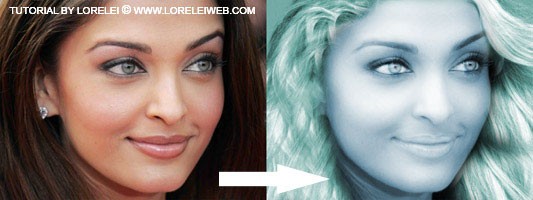
This tutorial is mostly for advanced users, as it will require a lot of “manual labor”, brightening small areas in the face, adding hair from another picture, etc. If all these steps won’t be done neat, you are risking to make a funny monster, rather than a mermaid… anyway, this is what we will do:

Unfortunately a PSD file of this tutorial is not available at this time but as soon as we release the PSD membership club, I hope to include a file with this effect as well. Star of by taking a photo of a brunette girl. We used a downsized wallpaper of this woman:
http://vetton.ru/models/6406.html
Duplicate the photo so that you will have 2, or even 3 layers. If anything goes wrong, you can always pull out an intact layer and you can start allover again.
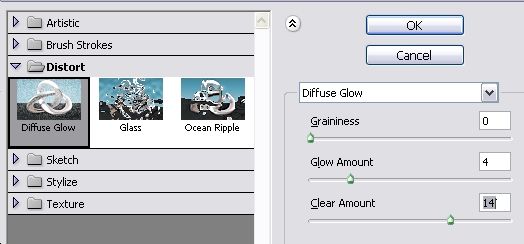
Select the upper layer and go to Filter >> Distort >> Diffuse Glow.
This will give your photo a nice dreamy effect for a start.
Next step is to colorize your photo. As you know, mermaids tent to have blueish face (they have drown, don’t forget! ) and greenish blond hair.
So, press Ctrl + U to colorize your photo (entirely) and apply these settings:
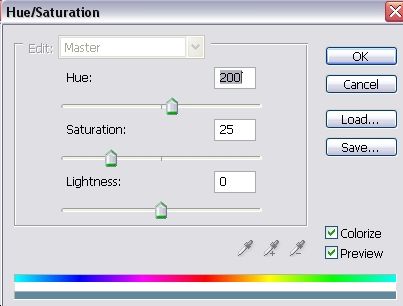
This is what you got. Mildly glowing and blue colored face. if you don’t wish to go ahead with your Photoshop skills and create a mermaid, you can stop here, this result may look good if you want to add mystery to your ordinary shot.

Next, select the Dodge Tool in Photoshop, about 3px with a soft edge, and go over the inside of the eye, lightening the eye balls and the eyes themselves, but try not to touch the contour of the eye, in order not to make the entire area too pale.

hey its my ash turns into a mermaid nice.
I thank you very much, webmaster, for this great blog. I really appreciate your posts.
Webmaster, I love your site. Thank you sooo much for working on it.
Very cool post
Thank you very much for that magnificent article
Thank you very much for that magnificent article
cute Aish to Devils Own
Really cool idea for a tutorial. Thanks.
Nice article man! I did it but my hair is all in the wrong place, anyway i spent rly little time so im happy.
Hi, recommend another good tutorial Turn girl color photo into pencil sketch
Nice article man thank you (:
Really cool idea for a tutorial. Thanks.
I would like to exchange links with your site loreleiwebdesign.com
Is this possible?
cool idea , i like it
thank you soooo much , that was great .
The information you provided was very useful. Because of your help, thank you.
http://www.medyumsitesi.com
medyum
what are you talking about my photoshop 1.0
yes there is nothing on 1.0 you should install cs5
it’s so expensive sorry, i will use 1.0
i LOVE THAT WEBSITE,
FOR SURE I’M GOING TO SHARE IN MY
TWITTER…:)
GOOD JOB GUYS.
my ash turns into a mermaid nice.
[…] blue mermaid girl Image by pumpkincat210 loreleiwebdesign.com/2009/12/26/turn-a-brunette-girl-into… […]