

Home / PS Tutorials

PS Tutorials · Tutorial

Photoshop Tutorial – Ancient Rough Gold Effect, Perfect for Game Logos and Text

PublishedAugust 17, 2009
Reading time2 min
Filed underPS Tutorials
Photoshop Tutorial - Ancient Rough Gold Effect, Perfect for Game Logos and Text - PS Tutorials Lorelei Web Design Photoshop Tutorial – Ancient Rough Gold Effect, Perfect for Game Logos and Text — August 17, 2009

you can use our texture image, just download the PSD file and pull it from there, or alternatively load it yourself. Click HERE to download the pattern image.
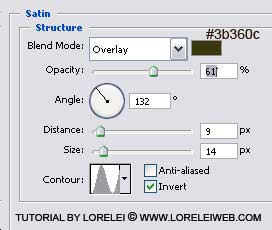
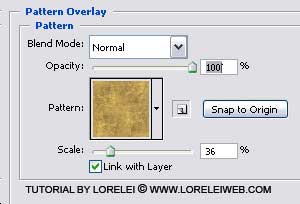
Photoshop Tutorial - Ancient Rough Gold Effect, Perfect for Game Logos and Text - PS Tutorials Lorelei Web Design

Photoshop Tutorial - Ancient Rough Gold Effect, Perfect for Game Logos and Text - PS Tutorials Lorelei Web Design

Do not skip this step, else your gold will look too dull without soft shades that this pattern overlay gives. If you do not have the pattern image, you may use ours, from Herringbone Text Effect – yes, I used the same one, how creative.

This is what you got so far:

Photoshop Tutorial - Ancient Rough Gold Effect, Perfect for Game Logos and Text - PS Tutorials Lorelei Web Design

Now, take the eraser tool, round, 9px, and draw a straight horizontal line in the middle of the text, as shown on the image below:
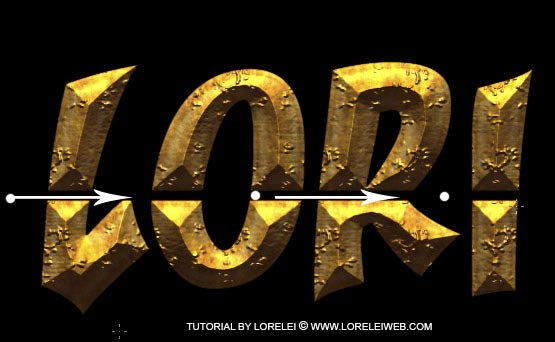
Photoshop Tutorial - Ancient Rough Gold Effect, Perfect for Game Logos and Text - PS Tutorials Lorelei Web Design

That’s it. Your result is ready. Hope you enjoyed the tutorial, please ask any question below or just download the psd file and analyze yourself.
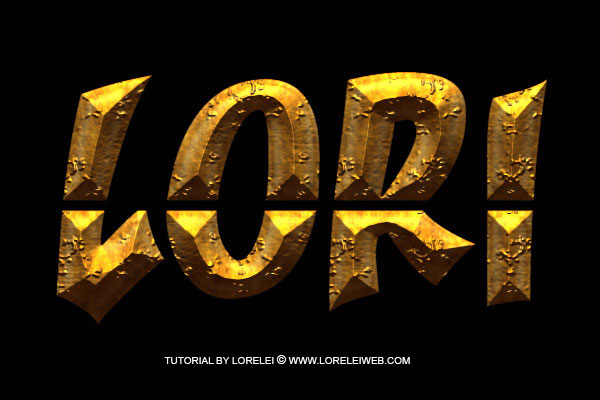
Photoshop Tutorial - Ancient Rough Gold Effect, Perfect for Game Logos and Text - PS Tutorials Lorelei Web Design

Written by

Elizabeth Lorelei Sramek

AI results optimization architect and SEO expert with 20+ years of experience. Crafting strategies that outrank, outperform, and outlast.

17 responses

  1. Vim August 20, 2009

    nice font, will use in future websites, can you put some font art on this blog?

    Reply
  2. pedro espinoza August 22, 2009

    good tut….=P

    Reply
  3. Hi there August 24, 2009

    Hi, in mail i received you had written and asked for tutorials you said not text effects and other… then why this text effect tutorial ?

    Reply
  4. Dave September 27, 2009

    Hi 😛 I’m stuck at the Pattern & Texture overlay. I dont have the “types” 🙁 Please help.

    Reply
  5. Best Texture World October 7, 2009

    Excellent tuts.

    Reply
  6. Widayad November 29, 2009

    thks

    Reply
  7. Photoshop Tutorials For Text Effect | Cosmos Blog January 11, 2010

    […] 5?Photoshop Tutorial – Ancient Rough Gold Effect, Perfect for Game Logos and Text […]

    Reply
  8. E7PX.com Design & Photoshop » Blog Archive » 10 Cool Photoshop Gold Text Effects Tutorials April 30, 2010

    […] Ancient Rough Gold Effect, Perfect for Game Logos and Text […]

    Reply
  9. Sweety November 12, 2011

    thanks for good tutorials

    Reply
  10. Efeitos de Texto no Photoshop 4 | Croquii November 22, 2012

    […] Estilo pedra Compartilhe isso:TwitterFacebookGostar disso:GosteiSeja o primeiro a gostar disso. […]

    Reply
  11. 20 excelentes efeitos de texto com o Photoshop | Bons Tutoriais April 4, 2013

    […] 16. Efeito estilo pedra […]

    Reply
  12. 20 tutoriais photoshop texto | TruiZz – Serviços de design, websites e redes sociais May 24, 2013

    […] 16. Efeito estilo pedra […]

    Reply
  13. 20 bài hướng dẫn về Gold Text Effect – Tung Vu Blog February 17, 2014

    […] 5.Ancient Rough Gold Effect […]

    Reply
  14. 10 bài hướng dẫn về Gold Text Effect – Tung Vu Blog February 17, 2014

    […] 5.Ancient Rough Gold Effect […]

    Reply
  15. 20 Best Photoshop Tutorials to Create Gold Text Effect – Xz webdesign October 30, 2014

    […] 7.Photoshop Tutorial – Ancient Rough Gold Effect, Perfect for Game Logos and Text […]

    Reply
  16. 10 bài hướng dẫn về Gold Text Effect – Siêu Imba September 7, 2015

    […] 5.Ancient Rough Gold Effect […]

    Reply
  17. Jewel Parlett March 31, 2018

    This site is just awesome. I’ve ask these informations a great deal and I
    view it that is good written, easy to understand. I congratulate you because of this research
    that I’ll tell to prospects around. I ask you
    to recommend the gpa-calculator.co page where each pupil or university student can find ratings
    gpa rating. Have a great day!

    Reply

Leave a response