

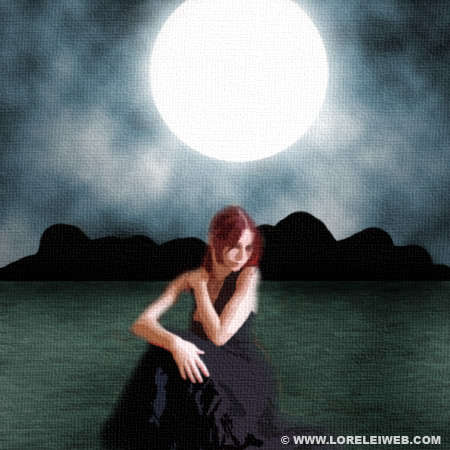

Set the opacity of the blurred noise layer to about 50%.
This is what you got so far…

Flatten the image.
Select (manually), using the marquee tool, the lower part of the canvas (“water”)
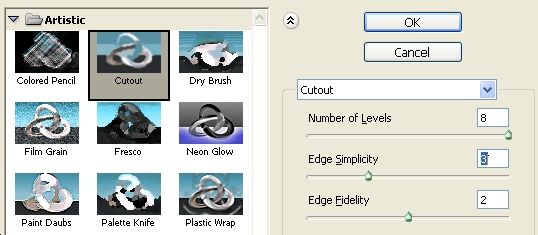
Go to Filter >> Artistic >> Cutout and apply these settings for the cutout effect.
Remember, we are making a painting, it should look as it it was made using a brush!
Now (while your “water” is still selected) go again to Image >> Adjustments >> Hue / Saturation, check the “colorize” box and make the water a bit greenish…

Create a new layer. Using the round brush (with sharp edge), go over the horizon line that separates water from the sky, as shown below:

Select the eraser tool and remove everything that was below the water line, see pic below:

Make a new layer again, select a sharp round brush of a huge size (about 200px) and make a stamp on a place where you intend to make your full moon.

Go to Layer>> Layer Styles >> Outer Glow and apply glow using the white color…

In your layers panel, select the background canvas (where we have the sky and water) and apply this lightening effect from the center of the “moon”, but not on the moon’s layer!

I first time visit in this blog. I find this blog is useful and workable.
very nice tut liz looks like something i have made some time ago
looks pretty cool. Didnt know that the canvas texture could look so real. cool tut
Remarkable lesson. You have again surpassed yourself. Continue in the same spirit.
P.S. Pardon, for bad English language. )))
oh well here ar my 2 results 🙂
First one
http://img296.imageshack.us/img296/362/psmoonlightrs8.th.jpg
and the second:
http://img299.imageshack.us/img299/7239/psmoonlight2li0.th.jpg
I hope these quality images dont effect my business!
What an amazing finish,really is a cool application.
Original Art painting on a digital canvas Photoshop Tutorial…
This tutorial’s purpose is to make an imitation of real painting, made using semi dry brushes….
I think its a cool picture good practice for the beginners to create their samples and nice work and good for upgrade themselves.
HI,
I am shahzad zar from pakistan karachi,
Very beautifull web site and art work,,,
Please visit my web site http://www.shahzadzar.com
http://www.artingallery
Thanks,
Very nice site!
I am not a graphics designer and do I not have any photoshop software. However, I do have a photo I want printed on canvas with this effect. Would you be interested in the job or be able to point me to someone who would be? Thanks.
you need to explain a bit more like how to get to the lightening effects i’ve spent more time trying to find things you didn’t say then actually doing the tutorial.