
You probably often heard about pixelated images and how ugly they look. Even this Awards Program will take a lot of points from your score if your graphics have a “jigsaw-like” edges. In order to understand how to avoid this rather unappealing look, we should first understand what causes the…
Photoshop Resources
-
-
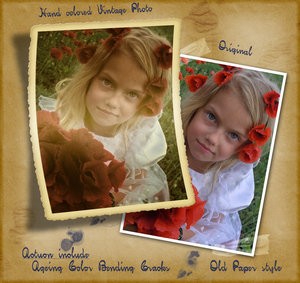
Vintage Frame Photo Effect Action
The so-called “vintage” effect is becoming more and more popular, however, not everyone knows how exactly to achieve it. It takes more than a mere sepia effect and adding grain-like, semi-visible noise. So, allow me to introduce: Hand-coloured Vintage Photoshop action. Action includes: Aging; Colour; Cracks; Bending and as a…
-
File Formats in Photoshop – Introduction
So you’ve gotten your brand new digital camera, and you’re ready to get out and take some pictures. But what’s the next step? Well, getting some form of Adobe® Photoshop (preferably Elements 3, or CS2) is a great step in the right direction. The Photoshop Tutorial will help you to…
-
.JPG vs .GIF – What Should You Use?
Do you oftentimes feel confused what to use for your web images– GIFs or JPEGs? And more importantly why? Great. You deserve kudos as confusion leads to comprehension. Here is what you have been looking for all the way! Essentially, they are formats in which web images are created in. Any…
-
Photoshop Cs3: Things You Need To Know
Adobe Systems Incorporated is engaged in building applications useful for photography, Web applications, designing etc. Adobe Photoshop cs3 (creative suite3) is the latest version of applications launched by Adobe systems on March 17, 2007. This is a highly professional application most suitable for photographers, designers and web site developers. Adobe…
-
Print Images using Adobe Photoshop
If you use Photoshop then you must be aware of its fine printing capabilities. People create images with Photoshop mostly for web design or printing purposes. Let’s discuss how you can print an image through the Photoshop interface the right way. When printing through Photoshop there’s one thing you need…
-
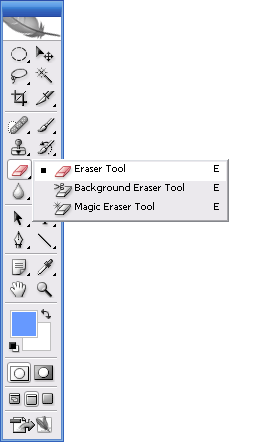
Using The Eraser Tool, Photoshop Basics
Have an object with edges you want to isolate? This is one way to use the Background Eraser tool. The Magic Eraser is often used to blast large areas that contain unwanted pixels. It certainly can be effective if you want to get fast results, but it is less than…
-
Learning to Use Photoshop Layers
Always Streamline and organize your Layers palette by creating and labeling groups of related layers. Layers are powerful tools, but things can get confusing if you don’t keep them under control by labelling them and placing them in sets. When layers appeared back in version 2 of Photoshop, designers wondered…
-
Why Should You Learn Photoshop?
Photoshop is an art to put it in the simplest form. It is a way for an artist to express him or herself as it can allow for the creation of an image which could never really happen or take place. Photoshop is a difficult program to learn. A novice…