Home / PS Tutorials

PS Tutorials · Tutorial

Awesome Text Effect With Sparkles 80’s Disco Style

PublishedDecember 21, 2009
Reading time3 min
Filed underPS Tutorials
Awesome Text Effect With Sparkles 80's Disco Style - PS Tutorials Lorelei Web Design Awesome Text Effect With Sparkles 80’s Disco Style — December 21, 2009

This is what we are going to do today, this very simple tutorial will lead to an awesome effect!

Awesome Text Effect With Sparkles 80's Disco Style - PS Tutorials Lorelei Web Design

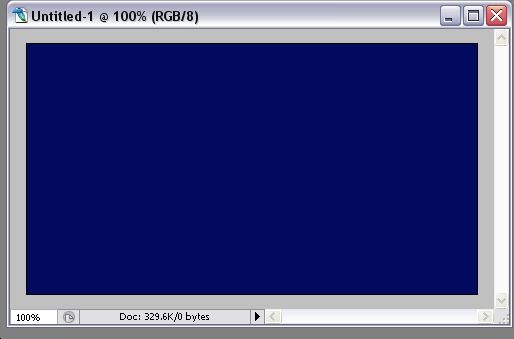
Start off by creating a new canvas, 450*250 pixels. It doesn’t matter with what colour you fill it as we will overlay it with a gradient effect later.
Awesome Text Effect With Sparkles 80's Disco Style - PS Tutorials Lorelei Web Design

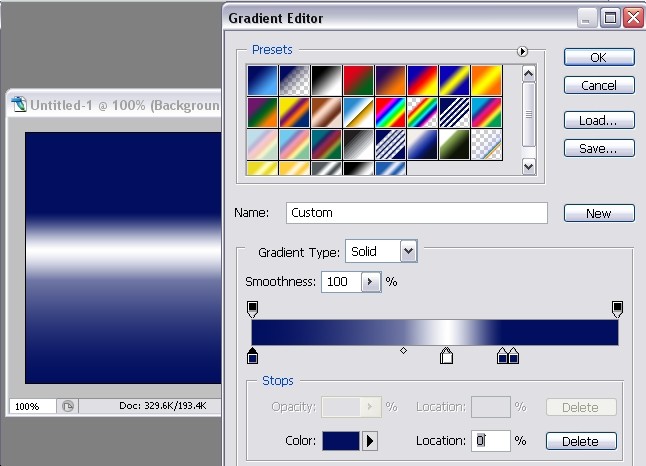
Make a new layer, and fill it with a gradient overlay, to do so, just go to Layer >> Layer styles >> Gradient. Organize the colour buckets as shown on the picture below, here are the colours you would need, from left to right:
#020e60 … #fefefe … #020f5e… #020e60
Awesome Text Effect With Sparkles 80's Disco Style - PS Tutorials Lorelei Web Design

Select the typing tool and type a word right over the whitish line. Don’t choose a slim font, we used “Spin Cycle” here, download it free at dafont.com
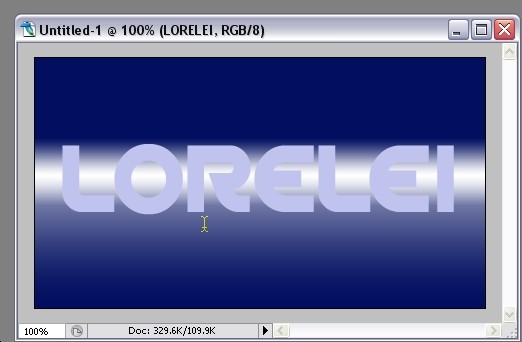
Awesome Text Effect With Sparkles 80's Disco Style - PS Tutorials Lorelei Web Design

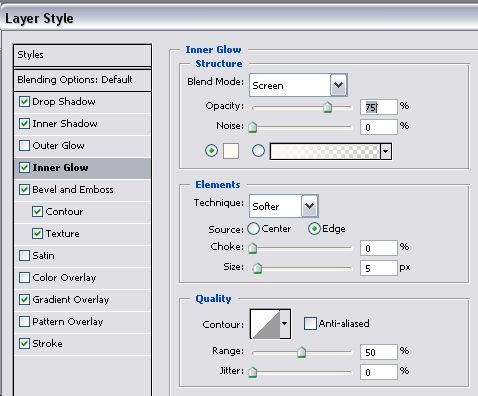
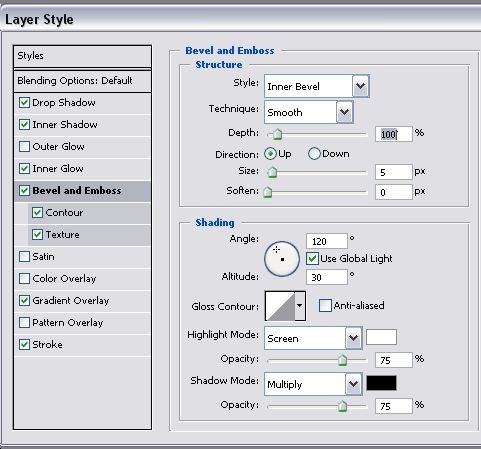
Go to Layer >> Layer styles >> Blending options, and apply these settings

Blending options:

Awesome Text Effect With Sparkles 80's Disco Style - PS Tutorials Lorelei Web Design

Drop shadow:

Awesome Text Effect With Sparkles 80's Disco Style - PS Tutorials Lorelei Web Design

Inner shadow:

Awesome Text Effect With Sparkles 80's Disco Style - PS Tutorials Lorelei Web Design

Inner Glow:

Awesome Text Effect With Sparkles 80's Disco Style - PS Tutorials Lorelei Web Design

Bevel and emboss:

Awesome Text Effect With Sparkles 80's Disco Style - PS Tutorials Lorelei Web Design

Contour: http://www.loreleiweb.com/preview/newtutie/9.jpg

Be sure to copy all the settings correctly, else it won’t look the same, especially the gradient and bevel settings.

Texture:
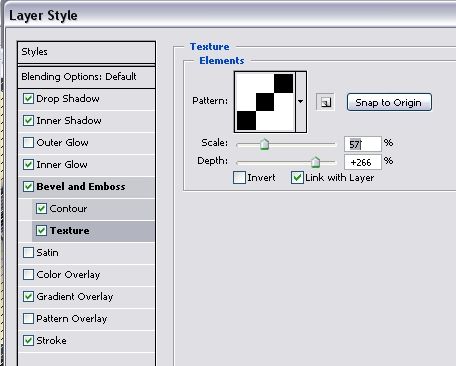
Awesome Text Effect With Sparkles 80's Disco Style - PS Tutorials Lorelei Web Design

Colours for inner gradient overlay, from left to right:
#000000 … #909090 … #fdf7f9 … #a7a7a7 … #787878 … #ffffff

Gradient Overlay:

Written by

Elizabeth Lorelei Sramek

AI results optimization architect and SEO expert with 20+ years of experience. Crafting strategies that outrank, outperform, and outlast.

5 responses

  1. eric January 4, 2010

    I used to be a member in your forum, what happened to it? I see most of the tutorials moved over here. Will LW forum be closed?

    Reply
  2. esspress January 4, 2010

    That’s really cool…

    Reply
  3. Photoshop Tutorials For Text Effect | Design resoures,Design technology,photoshop,photoshop plugins,photoshop tutorials,illustrator,icons-BENSBLOG January 12, 2010

    […] 1?Awesome Text Effect With Sparkles 80’s Disco Style […]

    Reply
  4. Photoshop Tutorials For Text Effect | Cosmos Blog January 14, 2010

    […] Awesome Text Effect With Sparkles 80’s Disco Style […]

    Reply
  5. LarryLar February 15, 2010

    Cool gonna try this

    Reply

Leave a response