


This tutorial was originally posted on loreleiweb.com and moved for technical reasons. Ok, yesterday I posted that old gold pic I made and Dale asked for a tutorial so here we go… in case you forgot what am I talking about, we are going to make this text effect:
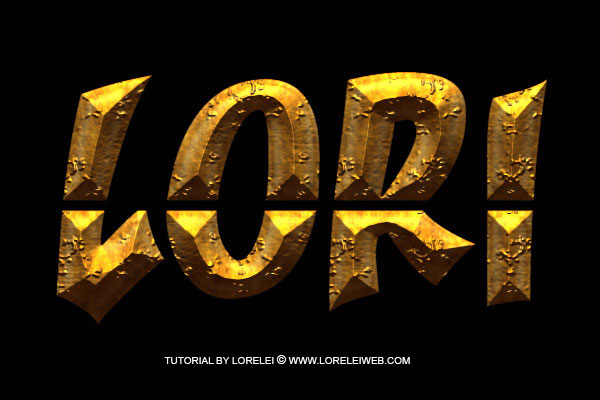
So… Make a new canvas, and fill it with black color (#000000). Please note that this tutorial will only good against dark, ideally – black background. We leave a dark border around the text, which is invisible to you now, though if we take a lighter hue for the bg, you will notice that the effect looks different, a lot less interesting.
Next, type a word on your canvas. Make sure you use a very bold font. We used ‘Yikes!’ for this tutorial.

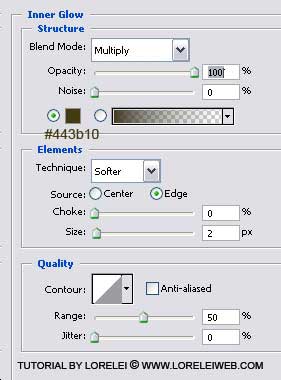
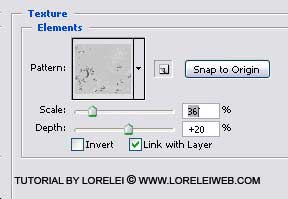
Go to Layer >> Layer Styles >> Blending Options, and apply the following settings:


nice font, will use in future websites, can you put some font art on this blog?
good tut….=P
Hi, in mail i received you had written and asked for tutorials you said not text effects and other… then why this text effect tutorial ?
Hi 😛 I’m stuck at the Pattern & Texture overlay. I dont have the “types” 🙁 Please help.
Excellent tuts.
thks
[…] 5?Photoshop Tutorial – Ancient Rough Gold Effect, Perfect for Game Logos and Text […]
[…] Ancient Rough Gold Effect, Perfect for Game Logos and Text […]
thanks for good tutorials
[…] Estilo pedra Compartilhe isso:TwitterFacebookGostar disso:GosteiSeja o primeiro a gostar disso. […]
[…] 16. Efeito estilo pedra […]
[…] 16. Efeito estilo pedra […]
[…] 5.Ancient Rough Gold Effect […]
[…] 5.Ancient Rough Gold Effect […]
[…] 7.Photoshop Tutorial – Ancient Rough Gold Effect, Perfect for Game Logos and Text […]
[…] 5.Ancient Rough Gold Effect […]
This site is just awesome. I’ve ask these informations a great deal and I
view it that is good written, easy to understand. I congratulate you because of this research
that I’ll tell to prospects around. I ask you
to recommend the gpa-calculator.co page where each pupil or university student can find ratings
gpa rating. Have a great day!