
When followed, this guide will prove to be quite a valuable web design resource, especially if you plan to use website development software in the future. From the inexperienced to the experienced, this guide has something for everyone. The Process of Great Web Design Just to make sure we are…
-
-
Text Behind Cracked Glass – Sleek And Easy Tutorial
This tutorial will teach you how to make a text that looks as if it is located behind a broken glass, which gives a little bit 3D feel to the image. It’s important to emphasize that this effect will only look good when we combine light text against dark background,…
-
Photoshop Cs3: Things You Need To Know
Adobe Systems Incorporated is engaged in building applications useful for photography, Web applications, designing etc. Adobe Photoshop cs3 (creative suite3) is the latest version of applications launched by Adobe systems on March 17, 2007. This is a highly professional application most suitable for photographers, designers and web site developers. Adobe…
-
Why Choose Digital Photography Over The Old Cameras?
One thing I discovered during my experience with digital photography, is that digital photography is very well suited for the portrait photographer. So why are we the last to jump on the band wagon? Many commercial shooters have known about and mastered the use of digital in their business’s for…
-
Print Images using Adobe Photoshop
If you use Photoshop then you must be aware of its fine printing capabilities. People create images with Photoshop mostly for web design or printing purposes. Let’s discuss how you can print an image through the Photoshop interface the right way. When printing through Photoshop there’s one thing you need…
-
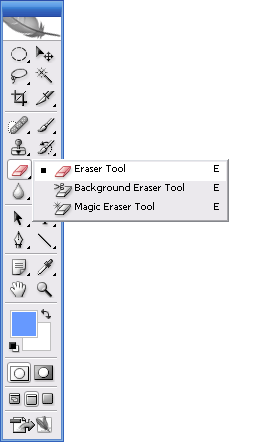
Using The Eraser Tool, Photoshop Basics
Have an object with edges you want to isolate? This is one way to use the Background Eraser tool. The Magic Eraser is often used to blast large areas that contain unwanted pixels. It certainly can be effective if you want to get fast results, but it is less than…
-
Learning to Use Photoshop Layers
Always Streamline and organize your Layers palette by creating and labeling groups of related layers. Layers are powerful tools, but things can get confusing if you don’t keep them under control by labelling them and placing them in sets. When layers appeared back in version 2 of Photoshop, designers wondered…
-
Why Should You Learn Photoshop?
Photoshop is an art to put it in the simplest form. It is a way for an artist to express him or herself as it can allow for the creation of an image which could never really happen or take place. Photoshop is a difficult program to learn. A novice…
-
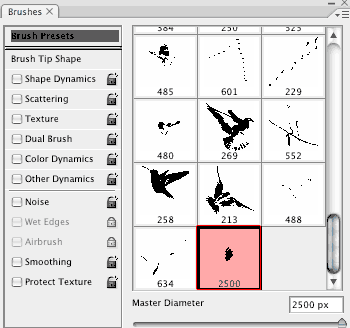
Adobe Photoshop Brushes Techniques
Brushes are the core component of many tools in the toolbox, and confident brush handling is essential for the effective application of these. You need to master brushes because this gives you many ways in which you can use and edit brushes will equip you with a whole new set…