

We are going to create a very cute, fluffy, marshmallow-like text effect. This is an ultra easy tutorial for newbies and of course you can implement the same technique for shapes and elements in your web design. PSD file is available to download for learning purposes. So this is what we are going to do in less than 10 minutes…

Start off by creating a new canvas, and fill it with a nice blue colour, we used #a4cbd9.
Using the free “Fertigo” font, write anything in white (#ffffff) colour.

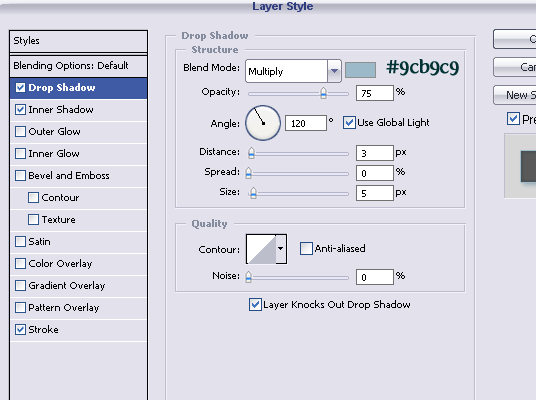
Go to Layer >> Layer Styles >> Drop Shadow and apply these settings:
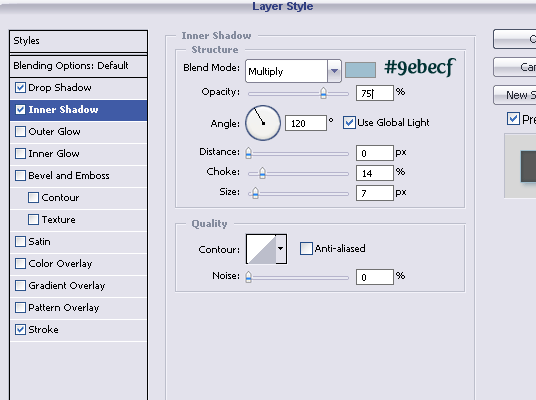
and, to outline the text a tiny bit, add stroke..
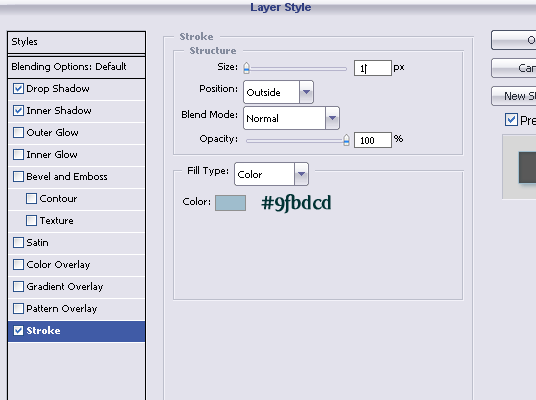
That’s it, really! Just press “OK” to apply your settings.
This was easy, wasn’t it? And if you want to shorten the way and learn directly from the PSD file, download it right HERE.

thats a little but nice effect thanks
Beautifull!!! Kinda Delicious!
nice and simple
just to inform you the website photoshopzone (dot) sk/?p=47 has a translation of this tutorial on there site and is hotlinking your images
[…] We are going to create a very cute, fluffy, marshmallow-like text effect. This is an ultra easy tutorial for newbies and of course you can implement the same technique for shapes and elements in your web design. Tutorial Link […]
[…] 30, 2010 in Uncategorized by Vjarski embaPub="60792d855cd8a912a97711f91a1f155c"; Fonte:https://loreleiwebdesign.com/2008/06/15/3-step-fluffy-text-effect-tutorial/ Vamos criar um muito bonito, macio, efeito de texto como marshmallows. Este é um tutorial ultra […]
[…] We are going to create a very cute, fluffy, marshmallow-like text effect. This is an ultra easy tutorial for newbies and of course you can implement the same technique for shapes and elements in your web design. Tuorial Source […]