


It’s been a while since the last time that I made a chrome-like text effect so i though let’s do something with metal elements again, since this is an effect that will never go out of fashion. Let’s make a quick but very useful tutorial, using gradients that will allow you to easily create any metallic effect later.
make a new Canvas and fill it with a dark color, we used dark gray with a little light spot in the middle to outline the effect. We are using 600 x 500 cnvas (and this is the size of the psd you can download, just scroll all the way down).

Using a curvy font and very big letters, type your word. We used the Harrington font with 260 pixels size, however in this particular effect, the biggest is your font, the better viewable is the result. Worry not about the color you are using at the moment for typing since we will overlay it with metallic gradients, which we designed specifically for this tutorial.

Go to Layer >> Layer Styles >> Blending Options and begin applying the effects…

Our Inner Shadow is pretty important so pay attention to the size and Quality.

We decided that default “Linear” curve doesn’t really outline the effect good enough, so we used a “half Round” curve. If you don’t have it pre-installed in your Photoshop, please use our mapping:

For outer glow, we use gradient from black (#000000) to white (#ffffff). The outer glow in this case creates an additional stroke around the text, which looks slightly rounded and with a mild gradient. Without these settings, your effect will not look complete and moreover look rather poor.

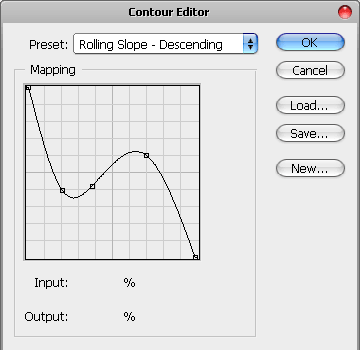
And, a Rolling Slope Contour, please note that we are using the “descending” path, otherwise we will have a totally different result..
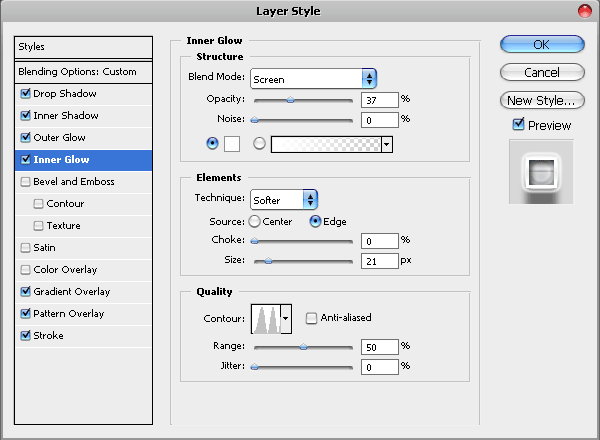
A mild touch of inner glow, just to smooth out the shadows at the edges of the text..

Now we are getting to the hardest and most essential part of this tutorial — the gradient overlay.
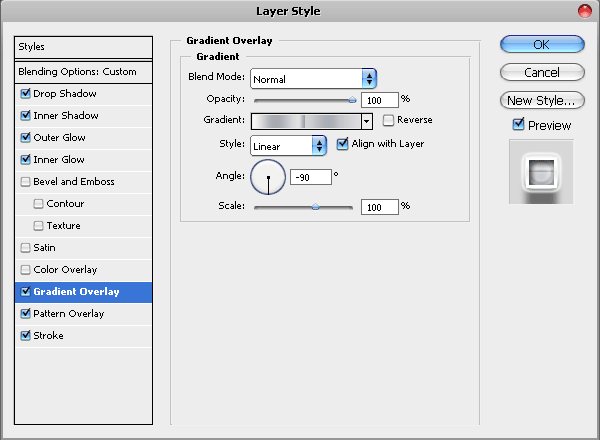
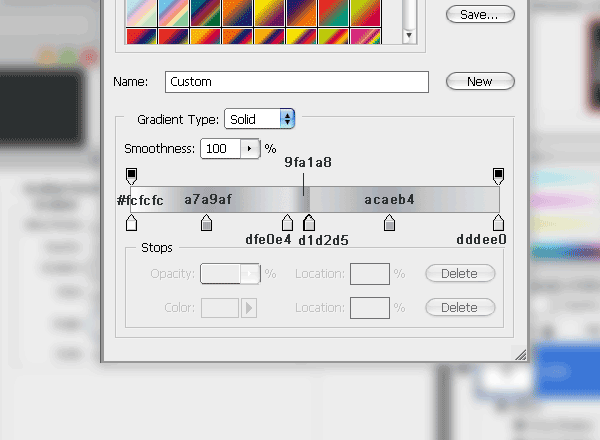
For beginners, it could be a little difficult to copy these gradients, but I strongly recommend that you won’t give up and try to copy them as close as possible since they will allow you to add a nice metallic touch to any text or object later. Just don’t forget to save them as a new gradient, for future use!
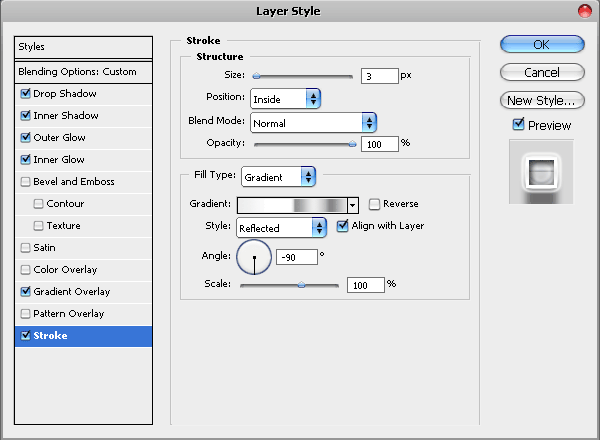
For Stroke effect we also used a gradient of metallic shades, however, not only it will be a different gradient (not like the one we just set up for the inner filling), but also we will set the style to “Reflected”. This allows us to have the gradient mirror-repeated, without having to set too many shades.

What’s good about these layer style settings is that it will look good on ANY font size, for example here we zoomed in using a font of nearly 700 pixel and you see all the curves, shades and gradients so neatly….

Here is our result! I hope you enjoyed the tutorial and if you decide to download the psd, please remember to click “return to merchant’s website” after you complete the transaction, so that the download will start instantly. Also, please join our Facebook page and subscribe free for future updates!



That’s a good tutorial with the print screen which makes it easy to follow and practise.
Thank you for this tutorial. Chrome effect is looks great. I’ll make use of it somewhere, for sure. 🙂
that is great to hear, thanks!
Thx for the tutorial, its awesome! now i got a cool wallpaper 😀
nice and advance work.
thanks.
nice…i like it…
wow thank you for this great tutorial! =)
Ahh chrome, you’re right, you can’t have too much chrome around. great tut. thx!
awesome tutorial, thanks for posting it.
[…] Tutorial Link […]
[…] Vamos a hacer una rápida pero muy útil tutorial, mediante gradientes que le permiten crear fácilmente cualquier efecto metálico más tarde. Tutorial Enlace […]
[…] Let’s make a quick but very useful tutorial, using gradients that will allow you to easily create any metallic effect later. Tutorial Link […]
[…] Let’s make a quick but very useful tutorial, using gradients that will allow you to easily create any metallic effect later. Tuorial Source […]
[…] Vamos a hacer una rápida pero muy útil tutorial, mediante gradientes que le permiten crear fácilmente cualquier efecto metálico más tarde. Tutorial Enlace […]