


Dec 26, 2009

Posted by Lorelei in Wordpress Plugins | 40 Comments

75 Best Wordpress Plugins That Make Bloggers Lives Easier

Wordpress is fun and blogging can, at some point, turn from a weekends hobby to a full time business online. Sounds familiar? But if you do consider making your blog a business, or at least taking it to a professional level, you will need to enhance your platform with some plugins. galleries to showcase your work, easy to manage contact form, and finally, ads management — plugins make the life so much easier, adverts will be removed automatically once expired and images will automatically be resized to optimize your blog for faster loading — that means YOU save a great deal of time and can us this free time to make more content or work offline. here is a list of 100 Best plugins that you absolutely must have in order to smoothly run a creative, professionally looking Wordpress blog.

1. YouTube Videobox Widget

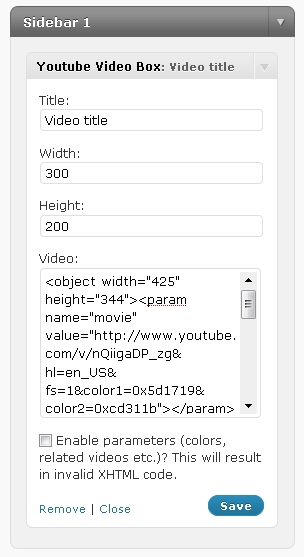
With Youtube Video Box Plugin you can add unlimited number of sidebar widgets to display Youtube videos in XHTML valid format.

This plugin also allows you to easily customize width and height of the videos directly in your widget panel. Optional function that enhances this plugin gives you the ability to chose colors in YouTube and enable or disable them in your widget panel. This plugin is ideal for those of you who wish to display several videos in easy-to-manage widgets, yet maintain a XHTML valid, SEO friendly website code.

Compatible with any java / ajax powered plugin, doesn’t affect the loading time and thanks to its’ lite structure, will not crash your site.
http://loreleiwebdesign.com/wp-content/uploads/HLIC/6193c4093d6728ebd723305e992137fb.jpg

2. Akismet

Automattic Kismet (Akismet for short) is a collaborative effort to make comment and trackback spam a non-issue and restore innocence to blogging, so you never have to worry about spam again.

akismet-helpful-wordpress-comment-plugin

3. WP Ajax Edit Comments

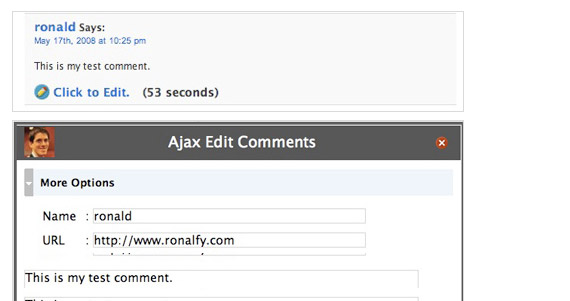
WP Ajax Edit Comments (for WP 2.5+) allows users and admins to edit comments on a post. Users can edit their own comments for a limited time, while admins can edit all comments.
ajax-edit-helpful-wordpress-comment-plugin

4. OpenID

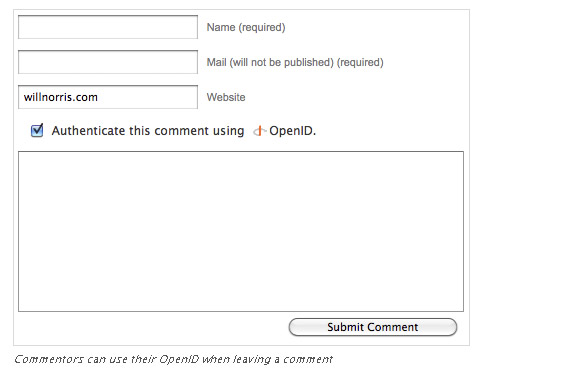
OpenID is an open standard that allows users to authenticate to websites without having to create a new password. This plugin allows users to login to their local WordPress account using an OpenID, as well as enabling commenters to leave authenticated comments with OpenID. The plugin also includes an OpenID provider, enabling users to login to OpenID-enabled sites using their own personal WordPress account. XRDS-Simple is required for the OpenID Provider and some features of the OpenID Consumer.
openid-helpful-wordpress-comment-plugin

5. GD Star Rating

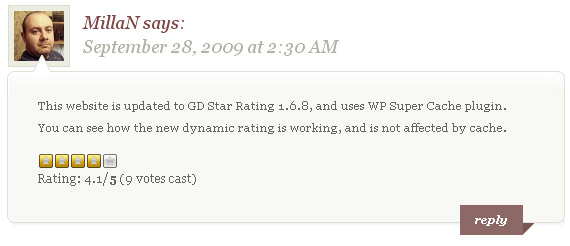
GD Star Rating plugin allows you to set up rating and review system for posts, pages and comments in your blog. I featured this plugin some time ago already, but this is totally related to comments.
gdrating-helpful-wordpress-comment-plugin

6. Comment Rating

Allows visitors to rate comments in Like vs. Dislike fashion with clickable images. Poorly-rated & highly-rated comments are displayed differently.
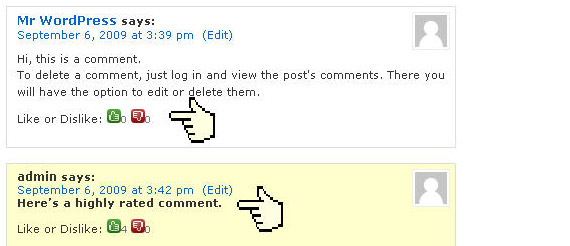
rating-comment-helpful-wordpress-comment-plugin

7. Clicky

While Google Analytics provides you with a long-term perspective on your site metrics, Clicky gives you instantaneous feedback. The dashboard includes traditional site metrics, but also offers cool features, like “Spy”, which pinpoints the location of current visitors on a map. It’s an easy way to get a snapshot of your site’s current activity and, in conjunction with Google Analytics gives you a comprehensive overview of your site’s activity.

http://loreleiwebdesign.com/wp-content/uploads/HLIC/eb02b8c8581e873976c1fef237d350a6.jpg

8. Twitter Avatars In Comments

Self explaining comment title, plug-in that uses Twitter to show avatars in comments in WordPress blogs.

twittar-helpful-wordpress-comment-plugin

9. SI CAPTCHA for WordPress

Adds CAPTCHA anti-spam methods to WordPress on the comment form, registration form, login, or all. In order to post comments or regiser, users will have to type in the phrase shown on the image. This prevents spam from automated bots. Adds security. Works great with Akismet. Also is fully WPMU and BuddyPress compatible.

captcha-helpful-wordpress-comment-plugin

10. Old Post Promoter

Old Post Promoter will choose posts at random from your published collection and change their publication dates so that they will appear on your front page and in your RSS feed.  Note that this does not work if your permalink structure includes dates.
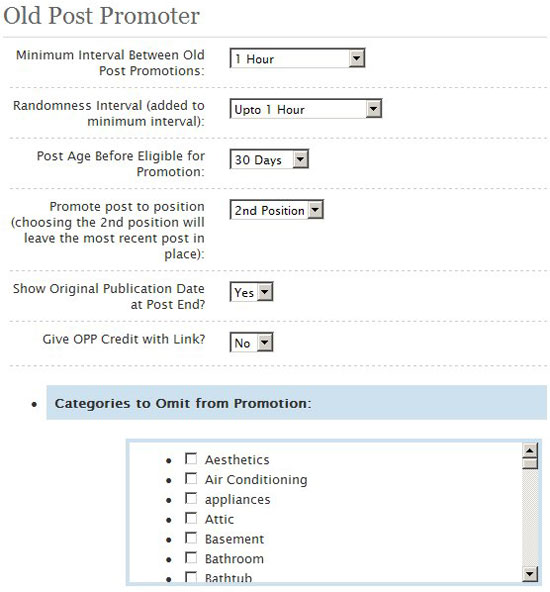
http://loreleiwebdesign.com/wp-content/uploads/HLIC/49e9946b4cc388eed46ddd434498ea2a.jpg

11. TinyMCEComments

This plugin turns the comment field from a primitive into a WYSIWYG editor, using the internal TinyMCE library bundled with WordPress 2.0 or up, without the need of another separate installation. Functions that only available to writers like adding images were removed and will not show up in the toolbar.

tiny-mce-helpful-wordpress-comment-plugin

12. CommentLuv

This plugin will visit the site of the comment author while they type their comment and retrieve a selection of their last blog posts, tweets or digg submissions which they can choose one from to include at the bottom of their comment when they click submit.
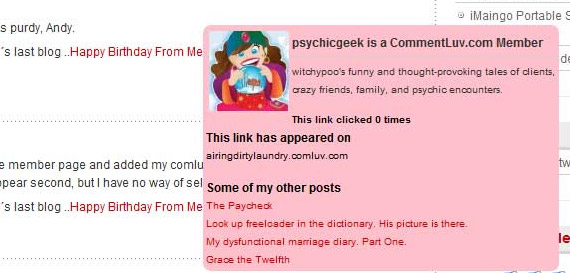
commentluv-helpful-wordpress-comment-plugin

13. SEO Smart Links

SEO Smart Links can automatically link keywords and phrases in your posts and comments with corresponding posts, pages, categories and tags on your blog.

Further SEO Smart links allows you to set up your own keywords and set of matching URLs. Finally SEO Smart links allows you to set nofollow attribute and open links in new window.

seo-smartlinks-helpful-wordpress-comment-plugin

14. Theme Options

This plugin manages theme customization. Everything is managed in the WordPress Backend. Code snippets can be activated, copied, created, deactivated, deleted, edited, and uploaded. For comments you can highlight different comments based who wrote them and where they are, also nice feature to automatically add “about author” section.
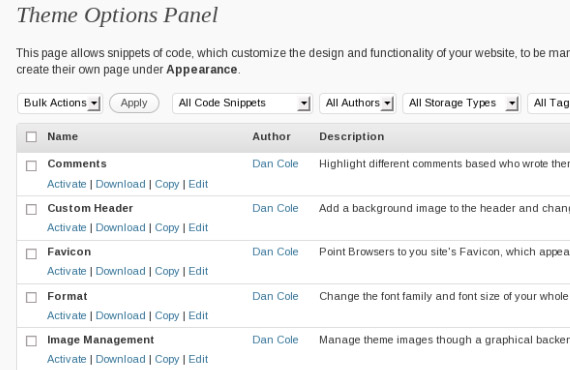
theme-options-helpful-wordpress-comment-plugin

15. WP-Paginate

WP-Paginate is a simple and flexible pagination plugin which provides users with better navigation on your WordPress site. Starting in version 1.1, WP-Paginate can also be used to paginate post comments!

wp-paginate-helpful-wordpress-comment-plugin

16. @ Reply

This plugin allows you to add Twitter-like @reply links to comments. When clicked, those links insert the author name and a link to the comment you are replying to in the textarea.

@reply-helpful-wordpress-comment-plugin

17. IntenseDebate Comments

IntenseDebate Comments enhance and encourage conversation on your blog or website. Custom integration with your WordPress admin panel makes moderation a piece of cake. Comment threading, reply-by-email, user accounts and reputations, comment voting, along with Twitter and friendfeed integrations enrich your readers’ experience and make more of the internet aware of your blog and comments which drives traffic to you!

IntenseDebate-helpful-wordpress-comment-plugin

18. Easy Comment Uploads

This plugin allow your visitors to attach images or other file to their comments as easily as possible.

easy-upload-helpful-wordpress-comment-plugin

19. Quote Comments

This plugin adds a tiny link that says “Quote” on each comment on your posts. Click it, and the contents of the comment is copied to the comment area, wrapped in blockquote tags. It’s even compatible with MCEComments plugin.

quote-comments-helpful-wordpress-comment-plugin

20. SEO Super Comments

For each user comment plugin will create a new dynamic page on the blog, holding the actual comment information. This page will not actually exist in WordPress database, but we will create it dynamically using a WordPress plugin.

What we instantly get in this way is big jump in site’s index visible to search engines. This is possible because blog comments are crawl-able, index-able and most importantly rank-able content. Also meaning you will start to get search engine traffic for the context of the comment.

seo-super--helpful-wordpress-comment-plugin

21. TTFTitles

The TTFTitles plugin is another dynamic text replacement plugin that lets you replace your headers with images using any TrueType font you choose. It’s mostly a rework of the Image Headlines plugin. It has been tested with WP 1.5.2 up through 2.7.

22. Tango Smileys Extended

Smileys in comments is also supported, and may be inserted using the standard emotion shorthand or through the CTI interface introduced in TSE 2.0.1b.

tango-smileys-extended-helpful-wordpress-comment-plugin

23. Greg’s Threaded Comment Numbering

This plugin numbers your comments sequentially and hierarchically, with full support for the new comment features available in WordPress 2.7 and later — including threading, paging, and your choice of ascending or descending date order.

gregs-threaded-helpful-wordpress-comment-plugin

24. WP-SpamFree Anti-Spam

An extremely powerful WordPress anti-spam plugin that eliminates blog comment spam, including trackback and pingback spam. Finally, you can enjoy a spam-free WordPress blog! Includes spam-free contact form feature as well.

25. Simple Pull Quote

The Simple Pull Quote plugin lets you insert pull quotes into your blog posts to emphasize certain sentences or phrases using custom fields. Pull quotes can be styled by editing the included CSS file. It works with WP 2.7 or 2.8.

26. Live Comment Preview

Live Comment Preview is the simplest way to get live comment previews on your site. Simply activate the plugin -That’s it! This plugin uses only client-side Javascript to format a preview, it does not make any Ajax requests to the server. This provides a smooth live preview as you type.

live-preview-helpful-wordpress-comment-plugin

27. AJAXed Wordpress

AWP’s basic features include inline paginated posts, inline comments, threaded comments, the ability to submit comments with AJAX, pagination of your homepage, live comment preview and much more, but it does not, however, force you to use any feature, and it also allows all aspects of the plugin to be easily customized through a single Administration panel. It also has special features that will ensure compatibility with many other plugins.

ajaxd-wordpress-wordpress-comment-plugin

28. Ajax Comment Posting

There are many comment-related plugins in Wordpress plugin directory. However, if you’d like to find just a simple comment-posting Ajax plugin, you won’t find any. That’s why I developed a simple and small (5kB) yet functional Ajax Comment Posting (ACP) plugin. Not only will it post your comment without refreshing the page, but it will also make sure that you’ve filled all the form fields correctly.

29. WP Super Edit

WP Super Edit adds a host of WYSIWYG options to the standard WP visual editor. It adds two full rows of additional features to your visual editor toolbar, including options for applying specific styles and for adding and formatting tables. It’s known to work with version 2.8 and 2.8.1.

30. Riffly Webcam Video Comments

Riffly is a free service that easily plugs into your site allowing visitors to create video and audio comments.

riffly-helpful-wordpress-comment-plugin

31. Ozh’ Absolute Comments

Absolute Comments is a comment manager plugin that lets you instantly reply to comments, either from the original Manage Comments administration page, or from the email notification, without the hassle of visiting the post first.

absolute-comments-helpful-wordpress-comment-plugin

32. NoFollow Free

This Wordpress plugin remove the “nofollow” attribute from your wordpress blog’s comments (precisely from the author’s links) and/or from the comments text links and it inserts (if you want) an image band at the top of your pages with the phrase: “NOFOLLOW FRE” to encourage your users to submit comments. The last release includes new options to replace the nofollow only when the author posted X comments before and put back the nofollow when some blacklisted words are matched. The replacement of the nofollow is also based on the users type (registered and visitor users). Every option can be customized by the options page “NOFF”.

no-follow-helpful-wordpress-comment-plugin

33. Subscribe to Comments

Subscribe to Comments is a robust plugin that enables commenters to sign up for e-mail notification of subsequent entries. The plugin includes a full-featured subscription manager that your commenters can use to unsubscribe to certain posts, block all notifications, or even change their notification e-mail address!

34. Subscribe to Double-Opt-In Comments

Allows readers to receive notifications of new comments that are posted to an entry, with Double-Opt-In Feature. Based on version 2 of “Subscribe to Comments” from Mark Jaquith

35. WP Comment Remix

WP Comment Remix adds a plethora of new options and features to Wordpress. From Reply and Quote links for commenters, to a full upgrade to the edit comments pages in the admin panel, WPCR will save you time and effort when running your blog.

36. Moderation Notify Author

WordPress doesn’t automatically notify the author of a post about waiting comments. Instead all comment moderation requests go to the admins. This plugin will notify the author of the post as well as the admin. This will allow the author to moderate the comments too.

37. WP Slimbox 2

A WordPress implementation of the stellar Slimbox2 script by Christophe Beyls (an enhanced clone of the Lightbox script) which utilizes the jQuery library to create an impressive image overlay with slide-out effects.

wp-slimbox-2-gallery-wordpress-jquery-plugin

38.Wordpress jQuery Lightbox Plugin

Used to overlay images on the current page, a little bit different popular Lightbox plugin.

If you want to see live demo of this plugin, just scroll down the page to see sample image and click on it.

lightbox-wordpress-jquery-plugin-useful-resource

39. Carousel Gallery (jQuery)

This plugin tweaks the gallery tag in Wordpress 2.6 thusly by replacing it with a javascript carousel. The plugin uses jQuery and a jQuery plugin called jCarousel.

carousel-gallery-wordpress-jquery-plugin

40. Shadowbox JS

Shadowbox is an online media viewing application that supports all of the web’s most popular media publishing formats. Shadowbox is written entirely in JavaScript and CSS and is highly customizable. Using Shadowbox, website authors can display a wide assortment of media in all major browsers without navigating users away from the linking page.

shadowbox-js-wordpress-jquery-plugin

41. jQuery Lightbox For Native Galleries

Makes the native WordPress galleries use a lightbox to display the fullsize images.

lightbox-native-gallery-wordpress-jquery-plugin

42. jQuery Comment Preview

Live comment preview without page reboot. Works on jQuery.

live-comment-preview-wordpress-jquery-plugin

43. Wordpress Plugin jQuery Pagebar

jQuery is a fast and concise JavaScript Library that simplifies HTML document traversing, event handling, animating, and Ajax interactions for rapid web development.

pagebar-navigation-wordpress-jquery-plugin

44. Google Analyticator

Google Analyticator adds the necessary JavaScript code to enable Google Analytics logging on any WordPress blog. This eliminates the need to edit your template code to begin logging. Google Analyticator also includes several widgets for displaying Analytics data in the admin and on your blog.

google-analyticator-wordpress-jquery-plugin

45. OpenID Comment Form

OpenID is an open standard that allows users to authenticate to websites without having to create a new password. This plugin allows users to login to their local WordPress account using an OpenID, as well as enabling commenters to leave authenticated comments with OpenID. The plugin also includes an OpenID provider, enabling users to login to OpenID-enabled sites using their own personal WordPress account.

openid-comments-wordpress-jquery-plugin

46. sCategory Permalink

Permalink option of Wordpress %category% has one great limitation – when this option is selected, Wordpress uses category with lowest ID for permalink generation. This plugin is intented to bypass Wordpress permalinks limitation and allows you to select category for permalink generation.

scategory-permalinks-wordpress-jquery-plugin

47. Google AJAX Translation

The Google AJAX Translation WordPress plugin provides a quick, simple, and light way to add translation to your blog.

google-ajax-translation-wordpress-jquery-plugin

48. Infinite scroll

Infinite scroll has been called autopagerize, unpaginate, endless pages. But essentially it is pre-fetching content from a subsequent page and adding it directly to the user’s current page. This means they never need to click “Next Page”, which dramatically increases stickiness.

infinite-scroll-wordpress-jquery-plugin

49. GD Star Rating

GD Star Rating plugin allows you to set up rating and review system for posts, pages and comments in your blog. You can set many options for displaying the rating stars, and also add widgets into the sidebars for displaying top ratings and other statistics generated by the plugin. Plugin includes advanced settings panels that will allow you to control many aspects of rating. Plugin also supports multi ratings along with thumbs based ratings.

gd-star-rating-wordpress-jquery-plugin

50. Image Drop Shadow

Image Drop Shadow wordpress plugin adds stylish drop shadow to images posted on your blog using jQuery. Just install it and all your posted images will automatically have a drop shadow.

image-drop-shadow-wordpress-jquery-plugin

51. J Post Slider

Show your post in fancy jQuery box, rotating images, with show-up text box with post description. This Plugin will present your HOT posts, in jQuery animation show.

j-post-slider-animation-wordpress-jquery-plugin

52. Live Blogroll

Live Blogroll will make your blogroll livelier. It will show a number of ‘recent posts’ for each link in your Blogroll using Ajax.

live-blogroll-wordpress-jquery-plugin

53. WP Wall

WP Wall is a “Wall” widget that appears in your blog’s side bar. Readers can add a quick comment about the blog as a whole, and the comment will appear in the sidebar immediately, without reloading the page.

wp-wall-wordpress-jquery-plugin

54. PixoPoint Menu Plugin

Adds an SEO friendly, accessible regular or dropdown menu to your WordPress blog.

pixo-point-menu-wordpress-jquery-plugin

55. Adding Form Validation to WordPress Comments using jQuery

This tutorial will show you how to use jQuery to do some instant checking on an example comment form.

form-validation-comments-wordpress-jquery-plugin

56. Snazzy Archives

Snazzy Archives is a visualization plugin for your WordPress site featuring an unique way to display all your posts. Your archive page will never be boring again!

snazzy-archives-wordpress-jquery-plugin

57. Shockingly Big IE6 Warning

The Shockingly Big IE6 Warning is a plugin that shows a warning message alerting the user why it is bad to use IE6, the security risk and the bad compatibility of Web Standards.

You can choose from 3 types of warning:

  • TOP, a discreet top bar
  • FULL, a fullscreen warning
  • CRASH, the mean option

shockingly-big-ie-warning-wordpress-jquery-plugin

58. Wordpress Plugin – My Page Order

My Page Order allows you to set the order of pages through a drag and drop interface. The default method of setting the order page by page is extremely clumsy, especially with a large number of pages.

my-page-order-wordpress-plugin

59. Using jQuery to liven up your WordPress login

Nifty Wordpress login page using Thickbox jQuery plugin.

wordpress-login-liven-wordpress-jquery-plugin

60. Plugin Central

Plugin Central is a comprehensive WordPress plugin solution. Main features are:

  • Install plugins directly by typing the name of plugin or the URL to zip file!
  • Multiple-plugin install feature allows you to move your plugins from one blog to another
  • Displays status of plugins in need of update on the Dashboard
  • Option to update all plugins at once!

plugin-central-wordpress-jquery-plugin

61. Tweet Blender

Similar in functionality to Twitter’s own widget but has support for multiple authors, hashtags, and keywords all blended together. The plugin can show tweets from just one user (as all other Twitter plugins do); however, it can also show tweets for a topic which you can define via Twitter hashtag or keyword. But there is more! It can also show tweets for multiple authors AND multiple keywords AND multiple hashtags all blended together into a single stream.

tweet-blender-wordpress-jquery-plugin

62. SimpleModal Contact Form (SMCF)

SimpleModal Contact Form (SMCF) is an Ajax powered modal contact form. It utilizes the jQuery JavaScript library and the SimpleModal jQuery plugin.

simple-modal-contact-form-wordpress-jquery-plugin-useful-resource

63. Accordion Image Menu

This is a different menu that uses your post images as a background. You can insert the menu wherever you want: content, php files or widget if your theme allows it.

accordion-image-menu-wordpress-jquery-plugin

64. Quick Search

Quick Search add AJAX Search to your site sorting results by Posts, Page and Comments. You can easly customize the popup menu style by modifying the file quick-search.css.

quick-search-wordpress-jquery-plugin-useful-resource

65. Ozh’ Better Plugin Page

Better Plugin Page brings a few valueable enhancements to the Plugin Management page: tiny icons, less clutter, quick action links. Handy for those who have 70+ plugins on their blog.

ozh-better-plugins-page-wordpress-jquery-plugin

66. Advanced Spoiler

Show or hide contents(text, image etc.) with animated effects wrapped by spoiler markup tag([spoiler][/spoiler]).

advanced-spoiler-wordpress-jquery-plugin

67.Highlight Search Terms

Highlights search terms using jQuery when referer is a Google, Yahoo or Lycos search engine or within WordPress generated search results. This plugin is a light weight, low resource demanding.

highlight-search-terms-wordpress-jquery-plugin

68. ”Audio Player

”Audio is a slim (450 Bytes!), fast plugin to create a flash mp3 player when mp3 links are clicked. In order to reduce clutter and file transfer, the links are unmodified until they are clicked, at which point a div with the player is faded in after the link. A second click on the link fades the player back out.

audio-player-wordpress-jquery-plugin

69. Wordpress Sidebar Turned Apple-Flashy Using jQuery UI

Beautiful tutorial, explaining how to modify and add Apple type sidebar using the Accordion plugin in jQuery UI.

sidebar-apple-flashy-wordpress-jquery-plugin

70. News-Ticker

A JQuery based News Ticker Displays a sliding or fading list of post titles, rss reeds or comments and excerpts with links to post.

new-ticker-wordpress-jquery-plugin

71. WP No External Links

Mask all external links to internal! In your own posts, comments pages, authors page
 It does not change anything or write to base – just processes output.

72. Spell, Style and Grammar check with After the Deadline

Smart plugin that uses artificial intelligence and natural language processing technology to find your writing errors and offer smart suggestions.
after the deadline

73. Improve page load time – WP Minify

Once enabled, this plugin will combine and compress JS and CSS files to improve page load time.

wp-minify

74. Check for Broken Links

This plugin will monitor your blog looking for broken links and let you know if any are found. It also works for images.

75. Manage who sees the ads

Advanced ad management plugin that lets you decide who will see your ads, depending on user defined conditions.

ad manager

  1. Can SEO links get links from other blogs too ? Or you know any plugin that can work like SEO links but with external articles ?

  2. Thanks for posting this. Very helpful and I’m going to try some of them.

  3. wew, I can choosing the best there are. thanks a lot

  4. amazing post man i love that its so useful for me

  5. pretty good list, a great help to new bloggers.

  6. pretty good list, a great help to new bloggers…

  7. Hi friend it’s looking a nice informative post in this blog . Thanks and like to share my thought here.

  8. Ho….Thank So Much For This Post

  9. Aksimet basically comes built into Wordpress now, so there’s really no reason to talk about it. It’s default.

  10. Awesome, thanks for the list, make me want to switch to Wordpress

  11. I use CommentLuv plugin

    Thank for info

  12. Very useful Post! really helped me out! hope to check more out soon

  13. Good Job.Keep it going.

    Thanks.

  14. Great blog….very helpful blog

  15. Well i mostly see this kind of things in all blogs that peoples are always commenting about different matters and topics instead of the topic they are on to, so this kind of things really makes me upset, because i always expecting to spread conversation at this kind of blogs and forum for improves my knowledge base.

  16. yep.. the list is great,i find it very useful

  17. The wordpress plugins displayed through useful examples seems to be a useful content for learning a lot about the kind of marketing being done on the internet. I am also going to start a kind very soon.

  18. Too many plugins will make bloging complex. So add only those plugins which are really necessary. Thanks for listing all these. Some of them are new to me.

  19. Great Tuts…thanks for sharing

  20. Really a very useful blog. I never knew so many useful and interesting plugins existed out there. Thanks a lot.

  21. wow these are cool, my blog is run on wordpress so I will be using a coupls of these :) thanks

  22. Awesome, that list must have taken ages to put together. I use many of them already although there is some others that I will now be trying out :-)

  23. great list!! thank you!

  24. Incredible list of plug-ins! Looks like my afternoon will involve plenty of plug-in test drives…thanks!

  25. That is probably the biggest and most comprehensive list of wordpress plugins ever made, thanks for that :)

  26. It’s really good and important informations.I am really thankful to u as well as I would like to tell you this is really a good article. Keep blogging.

  27. This is fantastic I am very interested in the focus of your post.Really helpful article.thanks for sharing with us.keep blogging.

  28. Great post.wow I like the presentation style of your blog.I think this post will so much useful & informatics for all reader.Keep blogging

  29. Nice compilation! There are several plugins here that I haven’t run across before and appear to be very useful. Thank you for taking the time to do this!

    -Don Elliott

  30. Awesome, thanks for the list, make me want to switch to Wordpress! LOL

  31. great list, i must say very good picks.

  32. Great list of plugins.
    It always amazes me how much there is to chose from.

    The only question that I come up with is. Which of these plugins add the most functionality to a site & which are just bells & whistles?!

    I guess (as always) it all depends on what is required.

    Thanks for the post : )

    PS: Are you using any of these on your loreleiwebdesign site?

    • Hi Sean,

      Well, I guess functionality is a matter of preference. So many people are crazy about galleries and I find them pretty useless LOL.
      On Lorelei Web design I try to keep the plugins to the utmost minimum as we have a huge CPU usage and too many plugins makes the problem worse. I do use however:
      Akismet, FeedBurner FeedSmith, NoLIP: Nofollow Links in Posts (did I list it here?), TweetMeme Retweet Button, W3 Total Cache and WP-Spam free.

  33. I thought this was a very interesting post thanks for writing it!

  34. I’ve been looking all over for this!

    Thanks.

Trackbacks/Pingbacks

  1. Designing Your First Wordpress Theme – The Full DIY Giude | Son Of Byte - Web Design & Development - [...] available for almost everything you want to perform with your blog (We do hope you already read our 75 ...
  2. Top SEO & Speed Wordpress Plugins To Boost Off 2010 | Tech Snacks - [...] 75 Best Wordpress Plugins That Make Bloggers Lives Easier [...]
  3. DeToatePentruToti.INFO » Blog Archive » Links for 2010-01-14 [del.icio.us] - [...] Lorelei Web Design 75 Best Wordpress Plugins That Make Bloggers Lives Easier [...]
  4. Your 2010 Toolbox For Building An Online Business, Blog, Community And Presence - [...] Wordpress Plugins: When Wordpress and your theme don’t provide an option that you want or need, look no further ...
  5. Lorelei Web Design » 75 Best Wordpress Plugins That Make Bloggers Lives Easier | Squico - [...] In: Wordpress plugins 10 Jan 2010 Go to Source [...]
  6. Twitted by CahayaBox - [...] This post was Twitted by CahayaBox [...]
  7. best wordpress plugins - [...] Lorelei Web Design » Blog Archive » ?? Best Wordpress Plugins That … 26 Dec 2009 … Trackback from ...
  8. SEO Plugins » Blog Archive » Lorelei Web Design » Blog Archive » 75 Best Wordpress Plugins That … - [...] Read the rest here: Lorelei Web Design » Blog Archive » 75 Best Wordpress Plugins That … [...]
  9. Wordpress Plugins » Blog Archive » Lorelei Web Design » Blog Archive » 75 Best Wordpress Plugins That … - [...] the original post: Lorelei Web Design » Blog Archive » 75 Best Wordpress Plugins That … Latest & Greatest ...
  10. Lorelei Web Design » Blog Archive » 75 Best Wordpress Plugins That … WP Air - [...] Go here to read the rest:  Lorelei Web Design » Blog Archive » 75 Best Wordpress Plugins That … ...
  11. Lorelei Web Design » Blog Archive » 75 Best Wordpress Plugins That … | Neorack Tutorials - [...] This plugin manages theme customization. Read ...
  12. Lorelei Web Design » Blog Archive » 75 Best Wordpress Plugins That … Reviews Me - [...] here to see the original: Lorelei Web Design » Blog Archive » 75 Best Wordpress Plugins That … ...
  13. Lorelei Web Design » Blog Archive » 75 Best Wordpress Plugins That … | Kerja Keras Adalah Energi Kita - [...] more from the original source: Lorelei Web Design » Blog Archive » 75 Best Wordpress Plugins That … AKPC_IDS ...
  14. Tweets that mention Lorelei Web Design » Blog Archive » 75 Best Wordpress Plugins That Make Bloggers Lives Easier -- Topsy.com - [...] This post was mentioned on Twitter by jonver nortez, Pradeep Nair R.. Pradeep Nair R. said: Lorelei Web Design ...
  15. Lorelei Web Design » Blog Archive » 75 Best Wordpress Plugins That … | Cheap Web Hosting Review - [...] some-more here: Lorelei Web Design » Blog Archive » 75 Best Wordpress Plugins That …Related Postsadsense hot keywords (new) ...
  16. Lorelei Web Design » Blog Archive » 75 Best Wordpress Plugins That … « Hot WP Themes - [...] database, but we will create it dynamically using a WordPress plugin . …Original post:Lorelei Web Design » Blog Archive ...

Leave a Reply