

So, start off by making a new canvas, and fill it with a dark background colour, we used black.
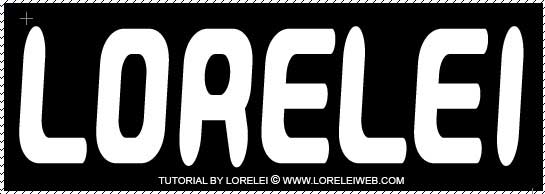
type the word u like… we used customized GauFont PopMagic.
go to layer >> layer styles >> blending options, and set the following settings:
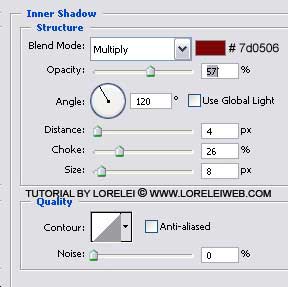
Inner Shadow
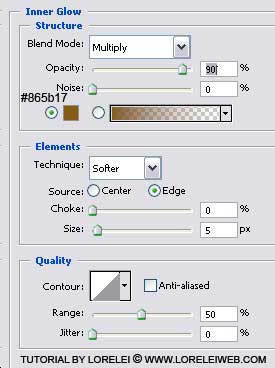
Inner Glow
and also…
Bevel and Emboss
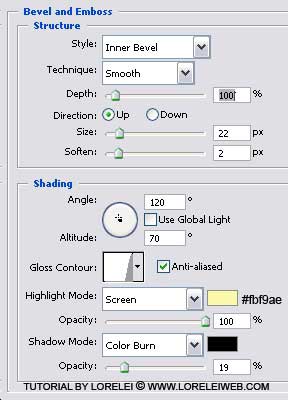
Contour Line Inside

Contour

Satin

Colour Overlay

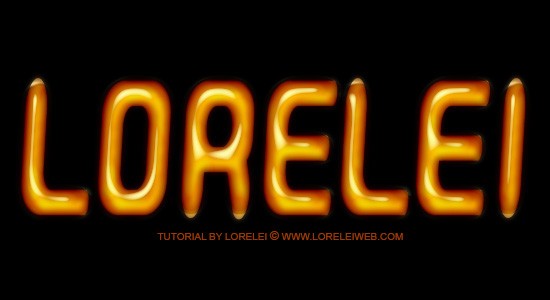
After all these settings, u will have this:

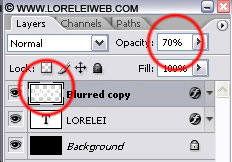
Now, duplicate your layer.
Select the upper (copied) layer and go to Filter Blur Gaussian Blur, and apply THIS BLUR
Reduce the opacity of the blurred layer to about 70%.
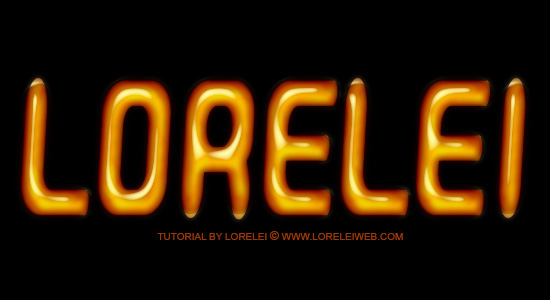
That’s it, hope u like the result, please post any questions u have!

Good tutorial
This font style is for P.SHOP 7.0 or ?
The Photoshop version does not matter as you just apply the settings, nothing else needed.
Hi everybody
im new but ive been doing some of the
tuts for some time now
this is what i got
but somehow it
didnt come out the same
im going to try a different font though
http://i5.photobucket.com/albums/y190/peeweesbabygirl/070308-1.jpg
wo that are great and so special … thank you so much
Thanks, really great and easy to follow tutorial!!!
I am just starting to learn in photoshop, and i am realy happy that i found this forum.
I tried out two of text effects- was trying to get some black petroleum effect, but could not make it shiny
http://lf.times.lv/melna%20elja.jpg
Hi – I have a general question regarding test effects – what is the general rule for print – Do text effects print well or there are some guidelines to follow?
Thanks
Hi,
This is Ruturaj i wanted to know how to create a animation like this would u tell me how to do it…..
Image Link:
http://i456.photobucket.com/albums/qq282/Ruturaj02/65.gif
I am unable to understand this post. But well some points are useful for me.
[…] Tutorial Photoshop Efeito Gel […]
estan fabulosos esos efectos sabes no se como le haces pero me quedan igualtis
[…] Dati click >aici< pentru a continua Adauga linkul pe blogul/siteul tau<a href="http://portalul.net/grafica-2d/photoshop/efecte-text/creati-un-text-uleios-si-reflectorizant-in-photoshop/" >Creati un text uleios si reflectorizant in Photoshop</a> Bookmark It […]
Hello foreign friends,
There is no word in the English language as ‘shinny’ . There is however ‘shiny’ pronounced ‘shy-knee’. It means to shine. Good-day.
I am unable to understand this post. But well some points are useful for me.
steps are not so easy i am unable to underland
Where are you stuck, BIKRAM?
I could not get the shiny effect either but did have fun… missing the oily part 🙂
Could be something to do with the layer styles settings I suppose.
[…] […]
[…] Oily and Shinny Text Effect in Photoshop […]
muy buen tutorial 😉
es genial !!
un bes00tte de BCN 😀
Thank you, nice design
HI IT WAS AND GOOD TEXT IT VERY ATTRACTIVE AND IT IS GOOD TEACHING PURPOSE &GOOD FOR THE LEARN
THIS OF TEXT
nice effect
[…] 14. Oily and Shinny Text Effect in Photoshop […]
i love this typography …thanks for sharing man