

Crumbled Gold Text Effect tutorial written by Lorelei
Today we will learn how to make a text effect which looks like crumbled gold.The tutorial is very easy if you have the needed components.
This will be your final result…
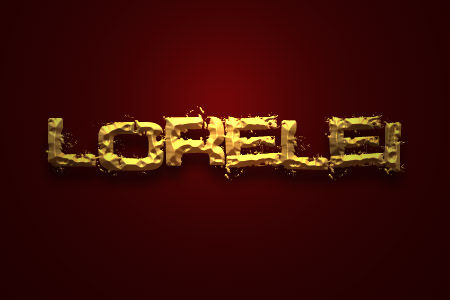
And now lets see how can we achieve this look.
Create a new layer – 450*300 px, and fill it with the following colour: #3c0101. Of course you may choose any other hue.
Select the typing tool (or press “T”) and type any word in the middle of the canvas. The choice of font here is very essential, do not choose any thin fonts or fonts with many twirls, it wont look good for this particular effect. We need a very bold font with slight crumbly effect, such as “Defused”, which is what we used here, download it free at dafont.com It doesn’t matter what colour you chose for typing as we will overlay it by a pattern.
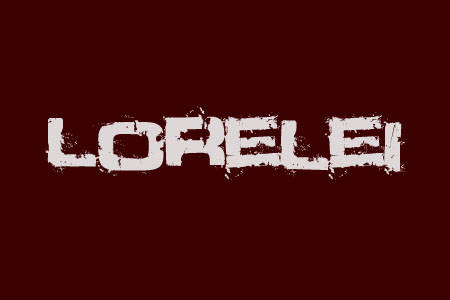
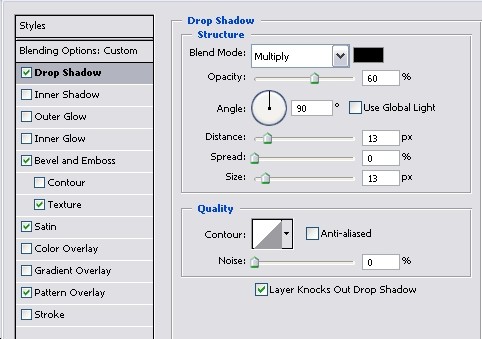
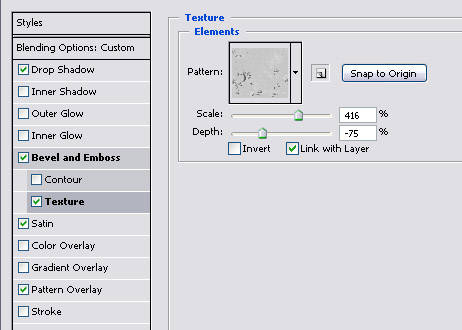
Go to Layer >> Layer Styles >> Blending Options and apply carefully these settings.
For Bevel and emboss: Highlight mode colour: #e5d266. Shadow mode: #5a3015.
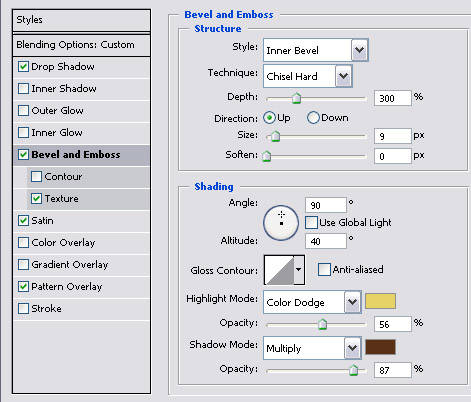
The texture for Bevel effect is called “RustTileBump” and is pre installed in many versions of PS already. If you don’t have it, it wont be a problem to download it from any PhotoShop free resources website.

Great blog design, showing the entire process was very helpful! I hope to see more web design case studies like this in the future.