
This tutorial was originally published on loreleiweb.com and moved over here for technical reasons.
Again a very easy and basic tutorial that doesn’t require much knowledge and experience with photoshop.
Create a new layer, dark brown or any hue. Select the typing tool and type any word / letter on it. I have chosen to use the #d99003 colour for my text, font called ‘Ballpark Weiner’ (available for a free download : http://www.dafont.com/ballpark-weiner.font ) However, if you select any other orange hue, it would still be great.. dont forget that in order to achieve “gold”, you need to start off with orange color.

Click on Layer >> Layer Style >> Shadow.
Apply the following settings:
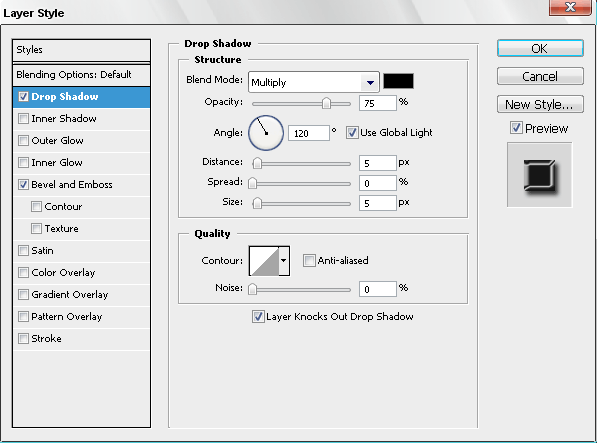
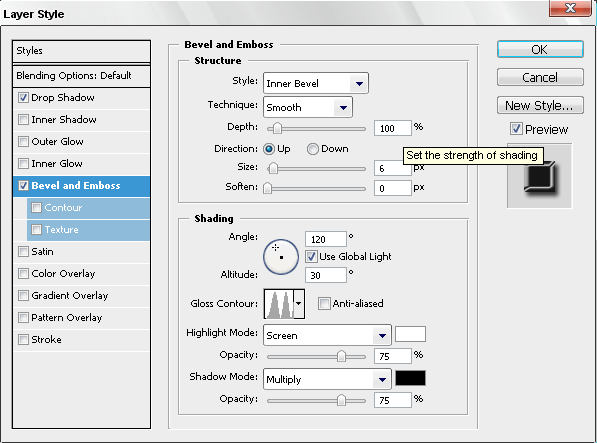
Go to Bevel and Emboss tab and apply the following settings:
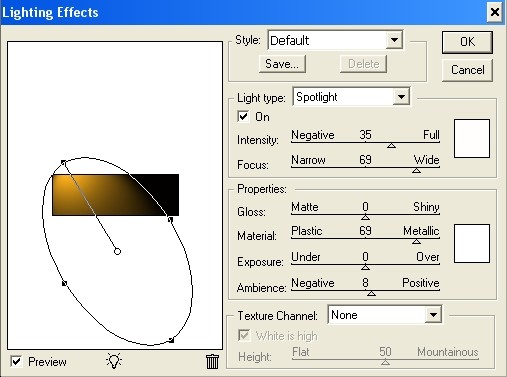
Now, for the final touch, click on Filter >> Render >> Lightening effect. Apply these settings on the background layer (not to the text!) in order to give your canvas a little bit more depth. Naturally, this is an optional step, but is highly recommended in order to make your final result look truly polished.



Ok this doesn’t work…it doesn’t make my text shiny gold…u must have forgotten a step!
Forget it i found the problem!
It doesnt work at all! moron!
[…] 7. Glossy Gold Text Effect […]
I do it with GIMP and when I installed the font, GIMP doesnt display it on it’s list of fonts, can you help me??
[…] Gold Text Effect […]
it didnt work dear…no glow
Excelente efecto, muchas gracias por el tutorial.
Saludos
??? what are ya saying this tut worked perfect and thank you for it
thanx igot it easyly
My text is still the orange color, could you have forgotten a step or do I have to have CS4 to accomplish this?
[…] This post was mentioned on Twitter by LoreleiWeb, Photoshop Tutorials. Photoshop Tutorials said: RT @LoreleiWeb RT @LoreleiWeb Gold Text Effect – Super Easy Photoshop Tutorial http://bit.ly/4QYNyw […]
[…] "6307823035"; google_ad_width = 250; google_ad_height = 250; More Photoshop Tutorials Posts LoreleiOver the internet, I'm a web designer currently working only for my own company but […]
It worked for only 2/3 people? Don’t listen to them, this works perfectly. Even for someone like me, who is using photoshop after a long time.
i like this typography …thanks for sharing man…
Really nice design…thanks for sharing…